Lot’s of economists use FRED – that’s Federal Reserve Economic Data for the uninitiated. It’s super easy to use for basic queries, data transformations, graphs, and even maps. Downloading a single data series or even the same series for multiple geographic locations is also easy. But downloading distinct data series can be a hassle.
I’ve written previously about how the Excel add-on makes getting data more convenient. One of the problems with the Excel add-on is that locating the appropriate series can be difficult – I recommend using the FRED website to query data and then use the Excel add-on to obtain it. One major flaw is how the data is formatted in excel. A separate column of dates is downloaded for each series and the same dates aren’t aligned with one another. Further, re-downloading the data with small changes is almost impossible.
Only recently have I realized that there is an alternative that is better still! Stata has access to the FRED API and can import data sets directly in to its memory. There are no redundant date variables and the observations are all aligned by date.

Stata does a pretty good job (not perfect) of finding data based on queries. Hopefully, you’ll see your desired series as well as some other ostensibly related ones. If you’re note sure whether you have the right series based on the visible info, then you can also describe the data in a separate window for more details.

Once you’ve selected your data, then you can determine the time period, the frequency and aggregation method, and vintage data sets. My absolute favorite part is that the interface encourages you to be self sufficient and efficient… They encourage you to code. At the bottom of the screenshot below there is a box that one can click in order to copy the command that will import the data set. That’s great! That means that you can customize your data and copy the command into your do file without having to actually import the data each time.
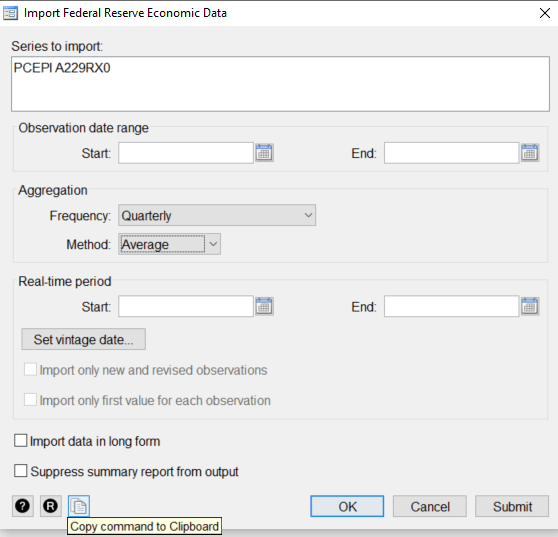
What’s more, each time that you finish submitting your request, Stata shows you the equivalent command that obtains what you want. Then you can adjust that code as you see fit for quick changes without having to navigate the the prompts each time. Stata imports the variable names and labels automatically and includes both a numerical date and a string date for good measure (just in case).

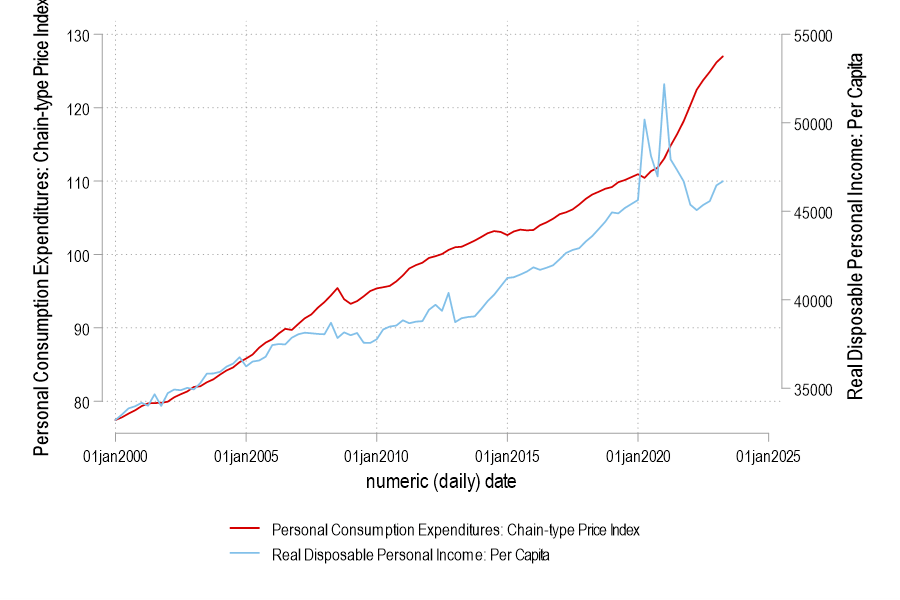
This tool is great because it makes data acquisition for research much faster. It’s also good for quick tutorials while teaching or when having a particularly well-informed macroeconomic disagreement. Obviously, once you become more familiar with your go-to series, then a do file can let you achieve everything that the FRED website achieves with greater speed and flexibility.
 Economist Writing Every Day
One thought on “Easy FRED Stata Data”