There seems to be something of a generational divide as to how important is your personal privacy. Folks under, say, age 40, have lived such a large fraction of their lives with Facebook and Amazon and Google and Twitter logging and analyzing and reselling information on what they view and listen to and say and buy, that they seem rather numb to the issue of internet privacy. Install an Alexa that ships out every sound in your home and a smart doorbell that transmits every coming and going to some corporate server, fine, what could possibly be the objection? So what if your automobile, in addition to tracking and reporting your location, feeds all your personal phone text messages to the vehicle manufacturer?
For us older folks whose brain pathways were largely shaped in a time when communication meant talking in person or on a (presumably untapped) phone, this seems just creepy. Polls show that a majority of Americans are uneasy about the amount of data on them being collected, but “do not think it is possible to go about daily life without corporate and government entities collecting data about them.”
There are substantive concerns that can be raised about the uses to which all this information may be put, and about its security. Per VPNOverview:
Over 1,800 data leaks took place last year in the US alone, according to Statista. These breaches compromised the records of over 420 million people.” . With smartwatches having access to so much sensitive information, here’s what kind of data can fall into the wrong hands in case of a data leak:
Your personal information, including name, address, and sometimes even Social Security Number
Sensitive health information collected by the smartwatch
Login credentials to all the online platforms connected to your smartwatch
Several times a year now, I get notices from a doctor’s office or finance company or on-line business noting blandly that their computer systems have been hacked and bad guys now have my name, address, birthdate, social security number, medical records, etc., etc. (They generously offer me a year of free ID fraud monitoring. )
The Internet of Things (IoT) promises to ramp up the snooping to a whole new level. I took note four years ago when Google acquired Fitbit. At one gulp, the internet giant gained access to a whole world of activity and health data on, well, you. The use of medical and other sensors, routed through the internet, keeps growing. One family member uses a CPAP machine for breathing (avoid sleep apnea) at night; the company wanted the machine to be connected on the internet for them to monitor and presumably profit from tracking your sleep habits and your very breath. And of course when you don a smart watch, your every movement, as well as your heartbeat, are being sent off into the ether. (I wonder if the next sensor to be put into a smart watch will be galvanic skin response, so Big Tech can log when you are lying).
According to a senior systems architect: “The IoT is inevitable, like getting to the Pacific Ocean was inevitable. It’s manifest destiny. Ninety eight percent of the things in the world are not connected. So we’re gonna connect them. It could be a moisture sensor that sits in the ground. It could be your liver. That’s your IoT. The next step is what we do with the data. We’ll visualize it, make sense of it, and monetize it. That’s our IoT.”
When my kids were little, we let them use cassette tape players to play Winnie the Pooh stories. With my grandkids, the comparable device is a Yoto player. This also plays stories (which is good, better than screens), but it only operates in connection with the internet. The default is that the Yoto makers collect and sell personal information on usage by you and your child (which would include time of day as well as choice of stories). You can opt out, if you are willing to take the trouble to write to their legal team (thanks, guys).
There are cities in the world, in China but also some European cities, where there are monitoring cameras (IoT) everywhere. Individuals can be recognized by facial features and even by the way they walk; governmental authorities compile and track this information. These surveillance systems are being sold to the public with the promise of increased “security.” Whether it really makes we the people more secure is heavily dependent on the benevolence and impartiality of the state powers. Supposing a department of the federal government with access to surveillance data became politicized and then harassed members of the opposing party?
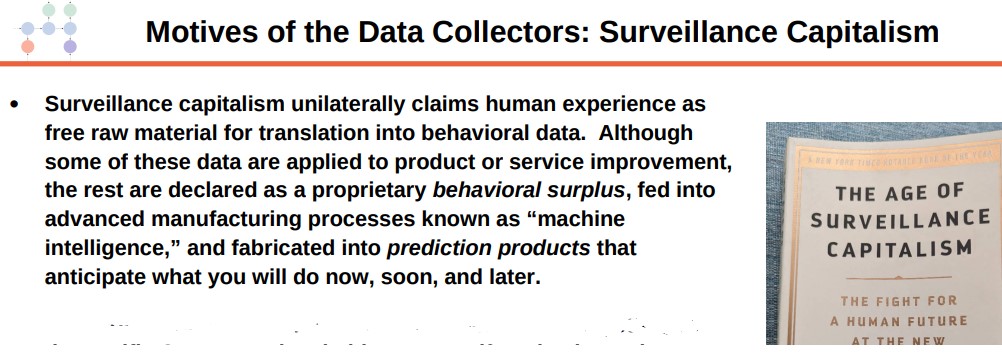
I’ll conclude with several slides from Timothy Wallace’s 2023 presentation on the Internet of things:
The dystopian novel 1984 by George Orwell was published in 1949. It describes a repressive totalitarian state, headed by Big Brother, which was characterized by pervasive surveillance. Ubiquitous posters reminded citizens, “Big Brother is watching you.” Presumably the various cameras and microphones used in the mass surveillance there were paid for and installed by the eavesdropping authorities. It is perhaps ironic that so many Americans now purchase and install devices that allow some corporate or governmental entity to snoop them more intimately than Orwell could have imagined.
For my birthday this year, someone gave me a “smart” plug-in power socket. You plug it into the wall, and then can plug in something, say a lamp, into the smart socket, which you can then control via the internet. Yay, I am now a part of the Internet of Things (IoT). What could possibly go wrong?
However, my Spidey-sense started to tingle, and I chose to give this device away. At that point, I was thinking mainly of the potential for such devices to get hacked and then recruited to be part of a vast bot-net which can then (under the control of bad actors) conduct massive attacks on crucial internet components. For instance,
Mirai [way back in 2016] infected IoT devices from routers to video cameras and video recorders by successfully attempting to log in using a table of 61 common hard-coded default usernames and passwords.
The malware created a vast botnet. It “enslaved” a string of 400,000 connected devices. In September 2016, Mirai-infected devices (who became “zombies”) were used to launch the world’s first 1Tbps Distributed Denial-of-Service (DDoS) attack on servers at the heart of internet services. It took down parts of Amazon Web Services and its clients, including GitHub, Netflix, Twitter, and Airbnb.
But it turns out the hazards with smart devices are widespread indeed. IoT devices are so useful for bad guys that that they are attacked more than either mobile devices or computers. One layer of hazard is the hacking of specific, poorly-secured devices in a home or institution, with subsequent control of devices and infiltration of broader computing systems. This will be the focus of today’s blog post. Another layer of hazard is the use to which masses of (sometimes private and personal) data snooped from “unhacked” smart devices are put by large corporations and state actors; that will be considered in a part 2 post.
Here are results from one study from nearly three years ago:
A study published in July 2020 analyzed over 5 million IoT, IoMT (Internet of Medical Things), and unmanaged connected devices in healthcare, retail, manufacturing, and life sciences. It reveals an astonishing number of vulnerabilities and risks across a stunningly diverse set of connected objects….
The report brings to light disturbing facts and trends:
Up to 15% of devices were unknown or unauthorized.
5 to 19% were using unsupported legacy operating systems.
49% of IT teams were guessing or had tinkered with their existing IT solutions to get visibility.
51% of them were unaware of what types of smart objects were active in their network.
75% of deployments had VLAN violations
86% of healthcare deployments included more than ten FDA-recalled devices.
95% of healthcare networks integrated Amazon Alexa and Echo devices alongside hospital surveillance equipment.
…Ransomware gangs specifically target healthcare more than any other domain in the United States. It’s now, by far, the #1 healthcare breach root cause in the country. …The mix of old legacy systems and connected devices like patient monitors, ventilators, infusion pumps, lights, and thermostats with very poor security features are sometimes especially prone to attacks.
So, these criminals understand that stopping critical applications and holding patient data can put lives at risk and that these organizations are more likely to pay a ransom.
I know people in organizations which have been brought to their knees by ransomware attacks. And I have read of the dilemma of the guy who was on vacation in the Caribbean or whatever, and got a text from a hacker instructing him to deposit several hundred dollars in a Bitcoin account, or else his “smart” refrigerator/freezer would be turned off and he would come home to a spoiled, moldy mess.
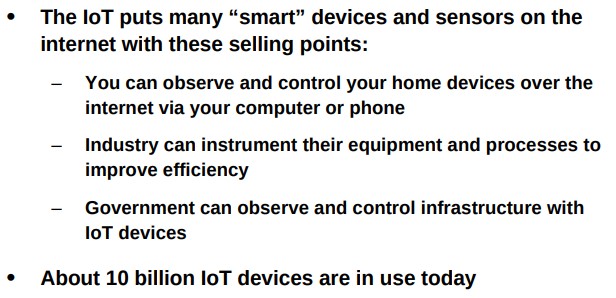
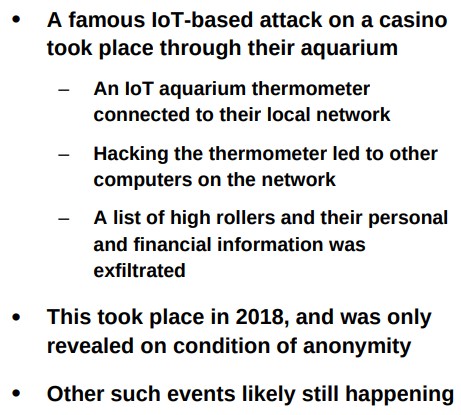
What brought all this IoT stuff to my attention this week was a talk I ran across from retired MIT researcher Timothy Wallace, titled “Effects, Side Effects and Risks of the Internet of Things”, presented at the 2023 American Scientific Affiliation meeting. The slides for his talk are here. I will paste in a few snipped excerpts from his talk, that are fairly self-explanatory:
(My comment: 10 billion is a really, really big number…)
(My comment: this type of catastrophic compromise of computer systems being enabled by hacking some piddling little IoT device that happens to be in the home or institution local network is not uncommon. Which is why I am reluctant to put IoT devices, especially from no-name foreign manufacturers, on my home wireless network).
Many of these vulnerabilities could in theory be addressed by better practices like always resetting factory passwords on your smart devices, but it is easy for forget to do that.
And just to end on a light note (this cartoon also lifted from Wallace’s slides):
The Raspberry Pi 400 is billed as a complete desktop PC for under $100 ($99.99). Is this for real, considering the cheapest regular computers are around $300 (plus paying for Word and Excel)? Your intrepid correspondent here dives deep to bring you the truth.
The Raspberry Pi series of microcomputer have been around since 2011. A typical Raspberry Pi is a printed circuit board, about 3 inches by 5 inches, with a microprocessor chip, some RAM memory, and many input/output ports. These ports include four USB ports, two micro-HDMI monitor ports, an Ethernet LAN port, a 3.5 mm audio/visual jack, and special camera-related ports (which can also handle a touchscreen). Also, a port for a micro-SD memory card, which is where the operating system and apps and data reside. But wait, there’s more: in addition to Bluetooth and wi-fi capability, the Pi has a 40-pin port for input and output to interact with the physical world. All this for around $35! [1]
Developed by the British nonprofit Raspberry Pi Foundation as an affordable educational tool, millions of Raspberry Pi units have been purchased by students and techies to learn-as-you-play and to do some useful projects. I have been aware of these devices for years, but I have been put off by how many peripherals you have to add to get an actual working unit – you have to add a USB-C type power supply, a keyboard, a mouse, and a monitor or other display. And you have to make or buy a case to put the circuit board in. All of which seems like a sprawling mess of wires and stuff. Also, the Pi does not have the computing power and memory to graciously run Windows and Microsoft Office apps like Word. Instead, it uses a Linux operating system instead of Windows, and LibreOffice apps for word processing and spreadsheets. I have never used Linux; it sounded exotic, maybe with a steep learning curve.
However, the good folks at the Raspberry Pi Foundation have come out with a new package for the Pi. This is the Raspberry Pi 400. The computing guts are housed inside a keyboard, with all the ports in the back. Thus, they provide the case and a keyboard, all in one tidy package, for about $70. The 400 lacks a few of the input/output ports found on the regular Pi, namely the camera-related I/O and the 3.5 mm headphone/video jack, but retains the 40-pin I/O port. For $100 you can get the complete Raspberry Pi 400 Personal Computer kit which includes a power supply, a mouse, a micro-SD card with operating software, a cable for the monitor, and a thick manual. I finally succumbed and bought the complete kit. [2] (Tip: To get the $100 price, you may do better to find a physical store location like Micro Center, since sellers on Amazon mark it way up to around $160, or sometimes they substitute the bare keyboard for the full kit). You just need to supply a monitor or a TV that has an HDMI input. [3]
So, how good is the Raspberry Pi 400? I have been pleasantly surprised. First, there was almost no learning curve on using the operating system. The version of Linux that is on the microSD card and which gets booted into the working RAM has a very Windows-like visual interface. I did not have to type in any arcane commands. It was all obvious point and clicks to open apps and documents. It helps that this is a pretty simple system, so not a lot of choices to wade through.
I entered my LAN wi-fi password, and was immediately on the internet using the built-in generic Chrome (not Google Chrome) browser. With the recent, improved software on the Pi, it happily streamed YouTube videos, etc. The LibreOffice suite includes apps which have most of the capabilities of Microsoft Office Word, Excel, and PowerPoint. You can configure some settings in LibreOffice to get the appearances, menus, etc., to even more closely match the Office apps. LibreOffice can save and open files in standard Office formats ( .docx, .xlsx, etc.) so as to share files with the rest of the world. This is pretty good for free software.
I’d rate the keyboard experience as “OK”. The keys are full size, but the feel and the keyboard angle are enough different from my laptop that my typing was slow. Maybe that would improve with use. If I were going to do a lot of typing on this, I would prop it at a more horizontal angle and rest my wrists on a pad sitting in front of the keyboard, to replicate my hand position on my laptop.
I have not yet played around with the 40-pin I/O port on the Pi 400. That sets it apart from a regular PC, giving the user a means to read inputs from the physical world, analyze them, and output desired actions (e.g., operate the watering hoses in a greenhouse or garden, depending on temperature and dryness of the ground). There are zillions of plans available on line for projects controlled by Raspberry Pi’s. Some are practical, some involve robots, and some are just whimsical, like retro video games and like this sugar cube launcher, which measures the distance to a coffee cup and shoots a sugar cube through the air with a trajectory calculated to land it in the cup. And here are another 26 Awesome Uses for a Raspberry Pi , including stop-motion and time-lapse videos (may not work on Pi 400 because it lacks regular Raspberry camera interface) and turning your Raspberry into a Twitter bot or web server that can host your own blog site.
The Verdict: Is This a Real PC?
Would I recommend this as a primary computer? Well, maybe, for someone on an extreme budget or living in a low-income country, or for someone in a situation where their computer is liable to get lost or broken or stolen. After all, it can do practically anything that a regular PC can do (email, YouTube, word processing, etc.). One area it falls way short in is compute-intensive gaming, so it is not for you if you need realistic spatters on your screen for Call of Duty. Also, if you have to go out and buy a new $150 monitor to use it, the value proposition starts to fall apart, but usually you have an old monitor or TV around or can borrow one from someone.
The LibreOffice apps will do most of what Microsoft Office does. The Pi cannot download Office and run it offline. However, if you can’t live without the authentic Microsoft Word experience, you can use the Pi as a terminal to log into Microsoft 365 and pay for and run the Web version of Word, Excel, etc. Also, you can plug in a USB microphone and USB webcam and use the Pi with Zoom.
Here is a list of further recommended programs ( all open source, Linux compatible) to install on a Raspberry Pi. These include programs for photo editing, media streaming, gaming, and connecting to a VPN. Here are more tips on the Pi 400 for home office use, including printing and online collaboration tools.
So, yes, a Pi 400 can do most of what desktop PC does, all for $99.99 plus tax [4]. Not to mention not paying an extra $150 or so for Microsoft Office. That said, most of us already have a portable laptop as our primary computer. We can carry it anywhere, and it has built-in display, camera, and speakers. And we have a large monitor on our desk for the desktop experience. For most of us, it is worth spending say $600 for our laptop-plus-monitor versus using an underpowered desktop PC tethered to a monitor and power cord.
So, realistically, most adults in the West would not probably choose the Pi 400 as their primary computer. However, it is a great little spare machine to have around for guests or for kids or for if something happens to your main PC. It can be a second PC on the corner of your desk to use while your main computer is tied up on a Zoom call. Multiple people (e.g. students in a classroom) can share a Pi, especially if each person has their own microSD card or USB to store their individual documents. You could use a Pi to stream music or video over some random speaker or monitor or TV or dedicate it to some similar specific purpose.
The software load includes Python, a popular programming language which may be worth learning. Also, the Linux operating system is very widespread in the computer world, powering most servers, so it can be useful to learn Linux as well. Although the newbie user will likely just use the Windows-like graphical user interface, the command line text Linux commands are available for use and practice on the Pi. The Pi 400 software also includes “Scratch” (good tutorial here):
Scratch is an easy to use block-based visual programming software that can run on a Raspberry Pi. Using this tool, you will be able to create your very own animations, games, and more using a straightforward drag-and-drop interface. The Scratch software is a great way to get young people started with programming and develop a general interest in computing.
The Raspberry Pi is a powerful tool for interfacing with the physical world, in the “internet of things.” A tech-inclined person (including a high school student) can find or invent a variety of fun and useful projects which make use of the input/output capabilities of the Pi. Since the internet can be problematic for kids, these sorts of projects with the Pi can keep them busy and learning on a real computer without necessarily having routine internet access.
Endnotes
[1] Some even cheaper, more stripped-down Raspberries have recently become available, such as the Pico and the Zero 2 W, to use as dedicated microprocessors for some specific application.
[2] I think one reason I got the Pi 400 was sheer nostalgia; my very first personal computer, purchased around 1985, was a Commodore 64. Like the Pi 400, the Commodore 64 was a low-cost keyboard with interface ports that you hooked up to a TV or monitor. I used the I/O port on the Commodore to control a Radio Shack robot arm, using relays on a printed circuit board that I etched myself. Good times.
[3] Normally, the sound output from the Pi 400 is transmitted to the monitor/TV along with the video in the HDMI. If you have some old monitor or TV that only has VGA video input, you can buy an adapter cable that converts HDMI to VGA (make sure you specify male/female correctly), but that only gets you the visual output. To hear the sound in this case, you’d have to either pair up an external Bluetooth speaker with the Bluetooth in the Pi, or plug in a USB speaker. (The other Raspberry Pi models, like the 4 B, include a 3.5 mm jack that sends both sound and video, so you could just plug in a headphone and skip the USB speaker).
A couple of random tips on the Pi 400 keyboard: The Raspberry key, near lower left, brings up the main menu. To get a clean shutdown, properly saving and closing documents and apps, use Fn F10. Another observation: You can run the Pi off a USB thumb drive instead of the micro-SD card, which can give faster performance and more storage.
[4] One learning I got from doing this review is that you could use your phone as a desktop PC: with an iPhone or iPad, for instance, you can drive an external monitor with a cable from the Lightning port, and use a Bluetooth keyboard/mouse for inputs. There are word processor and other apps that run on phones and tablets, including Microsoft Office. This should give a computing experience similar to that on a Raspberry Pi, although using iOS or Android-specific forms of the various apps.




 Economist Writing Every Day