Every year I request posts about stuff the writers actually use. My logic is that a great wave of stuff-buying is coming, so let’s try to highlight the good items and reduce holiday waste.
For Children
James recommends buying a whole bounce house. It might seem like something you could only afford to rent once a year, but the price of buying one you can use at home is now less than $300. In a big room, you can even do this indoors. Be the Christmas hero. Check on the space requirements.
I recommend two games that help kids learn to read. These are a great complement to Kindergarten or 1st-grade reading assignments. With enough confidence, you can convince kids that these games are toys and not “a book?”.
Velcro Cut to Length – Zachary suggests: “Do you have a phone charger beside your bed that keeps falling on the ground? Just Velcro it to the nightstand lamp and it will stay exactly where you want it.”
Minute Soil is better than the dirt you have. This makes growing plants more fun and easier. Sounds like a great gift to wrap up for someone who likes gardening.
Barge All Purpose TF Cement Rubber – Praise from Scott: “Unlike most “superglues”, it will work on rough or porous surfaces, including situations like leather where flexibility is needed.”
Qwix Mix windshield – Windshield wiper fluid concentrate that is easy to store at home for when you need it.
Lastly, Mike has some correct life advice. Give yourself what your future self would want. For example, if you enjoy video games but don’t exercise enough, then try setting up an exercise bike right in front of your video games. That way you’ll get your cardio in and not have regrets the next week.
My wife and I have different preferences for the kind of gifts that we like to receive. She likes earrings, flowers, massages, and electronics. I like hand tools, power tools, and any other item that makes domestic life more efficient. I can really appreciate a nice new pair of dockers or a button-down.
If you have a dad, husband, or anyone else in your life who appreciates practical gifts, then this list is for you. Below are four gift ideas that are sure to make the practical person in your life very happy – even if they may not be what you would want to receive. I’ve personally vetted all of the below items, so I can attest to the satisfaction that they are sure to provide that hard-to-shop-for person.
Is your life in disarray? Are your cords and chargers in disarray? Then look no further. Nothing compares to the knowledge that the nest of cords behind your wall unit is no more. Use Velcro to bind and truncate your computer cords and your kitchen appliance cords. Do you have a drawer or box full of tangled extras? Velcro is nice because you can cut it to your custom length and reuse it with minimal loss of life. You can also use it in electrical applications or in the cabin of your vehicle. Do you have a phone charger beside your bed that keeps falling on the ground? Just Velcro it to the nightstand lamp and it will stay exactly where you want it. AND, because it’s reusable, you can easily remove it and keep the cords in your luggage nice and compact.
Growing stuff is hard. But flowers, greenery, or even vegetables are nice. Yes, I’m basically recommending that you give someone dirt. But it’s awesome dirt. There’s this stuff called coconut coir. It’s coconut fiber that’s been compressed into a small disc or brick that’s ideal for shipping and delivery. Just add water and you’ve got some fancy dirt just waiting for an application. Coconut coir is all plant-based material, drains well, and it’s easy to store. You may not think of dirt as something that has a shelf life, but regular potting soil can definitely grow some unsavory things if you let it sit for long enough. Coconut coir is the solution to all of your spur of the moment small-scale horticultural endeavors.
Shipping items to our homes has been a game changer for shopping. But home delivery is not sensible for low priced heavy items like some liquids. My family was frequently running out of windshield wiper fluid and we’d end up stopping at a grocery store and overpaying. But no more! Qwix Mix is a windshield wiper fluid concentrate. Just an ounce in addition to a gallon of water saves us unplanned trips, high prices, and the storage cost of purchasing gallons of fluid ahead of time. I can’t vouch for the de-icing formulation, but the southern climate formula does exactly what it’s supposed to do.
Since the Covid recession, many of us have taken up our hand at cutting hair at home. For a while, we were borrowing a neighbor’s clippers. They were loud and had a short cord. But I’ve since purchased Ufree clippers and they are so much more convenient. They’re quiet, cordless, charge with a USB cord, and have a battery level display. But the battery lasts so long that you don’t even need to think about it. This kit comes with a beard trimmer, several guards, and a cape (throw the cape away, it’s bad). The clippers are metal and have some heft to them. Several colors are available – they come in black, silver, and gold finishes. But how can one not choose the gold ones?
That’s my list of great gifts for practical people. IDK your gift limit, but if you buy all 4 of these gifts you’ll spend about $100. That might leave room left over for stocking stuffers and chocolate.
(We’re not paid for any of these recommendations. But using our links is always helpful.)
This is an economics blog; here is a life hack that can save you some money, and maybe time. It can be really helpful to have your screwdriver magnetized, so a screw will stick to it. This past weekend I helped someone repair a microwave door, and for re-assembly I had to get a screw into its hole, where its hole was recessed in a narrow space where I could not have held the screw with my fingers whilst starting it with the screwdriver. So it was very helpful to just stick the screw on the end of the tool, and (carefully) insert the tip of the screw into its threaded hole and just start turning. Likewise, it was helpful in disassembly to be able to draw a screw out with the magnetized tip.
You can go buy a set of magnetized screwdrivers from Amazon. But these get mixed reviews and of course cost money and shipping delay and now you have more screwdrivers to store. A comment in one of the Amazon reviews clued me in that you can easily magnetize a screwdriver which you already have. Here is how:
( 1 ) Start with a strong magnet – – maybe a single magnet that you happen to have, or make a stack of say five medium sized disk refrigerator magnets. Techies can remove magnets from an old speaker or hard drive.
( 2 ) Using only one end (pole) of your magnet, draw it along the screwdriver shaft, from the top or middle out to the end, always in the same direction. Do this maybe four times, then rotate the screwdriver a quarter turn, then make another four strokes, and so on for all four sides of the screwdriver. You’re done.
I did this, and it worked great. A couple of further comments – – first, if there is no rubbery coating on your magnet and you don’t want to scratch up the finish on your screwdriver, you could put a single layer of masking tape or painters tape on the part of the magnet that is scraping along the screwdriver. Second, the hard steel of the screwdriver is not a great permanent magnet. You might need to do this again in a year, and you will never get a really strong magnetic effect (this may be why there were some complaints on Amazon). Also, if you give the screwdriver some sharp taps (or drop it on concrete floor), it can rescramble the magnetic domains and lose magnetic orientation in the steel, so again you’d have to repeat the treatment.
You can also magnetize a screwdriver by wrapping a coil of insulated wire around it, and hooking the wire up to a battery. Also, you can make the screwdriver magnetic temporarily by sticking a disk magnet on the shaft.
I suppose you could bring your magnet to your friend’s house and process his or her favorite screwdriver next time you go over for some other reason. Or you could make magnetized screwdrivers for gifts.
Now we are back to being able to buy KN95 and (even better) KF94 face masks, if a mask gets too breathed in, we can just throw it out and get a new one. But if for some reason (a new pandemic apocalypse like 2020?) you need to disinfect a face mask, there are ways.
Most flu and coronaviruses cannot live indefinitely on a dry surface. So one approach is simply to put each mask in its own dry paper bag (to prevent contact with more virus particles) and leave in a dry, preferably warm place for 3 days.
If you are in a hurry, apparently heating for 60 minutes at the oven at 70°C (158°F) will also do the trick.
Using a COVID test is a fairly serious matter – the results of such tests drive decisions on staying home and isolating or not, which in turn affect the spread of the virus in the population. I am known to use medicines that maybe expired six months earlier, figuring that the med will still be say 80% effective, but for a COVID test I want it to be as accurate as possible.
We all have on our shelves boxes of rapid COVID tests which were send out by the government in the first half of 2022. Most of these tests had nominal six-month lives, so according to what is stamped on the box, they are expiring right about now.
But wait – – that six-month life was just a (conservative) estimate from back when the tests were manufactured. For about a dozen out of the original 22 approved tests, subsequent data has shown that the tests remain accurate for longer than six months. Typically, the approved life is extended an additional six months or more. So before using or throwing out a box whose stamped expiration date has passed, go to this FDA link. You can quickly find your brand of test. The instructions for using this site are:
To see if the expiration date for your at-home OTC COVID-19 test has been extended, first find the row in the below table that matches the manufacturer and test name shown on the box label of your test.
If the Expiration Date column says that the shelf-life is “extended,” there is a link to “updated expiration dates” where you can find a list of the original expiration dates and the new expiration dates. Find the original expiration date on the box label of your test and then look for the new expiration date in the “updated expiration dates” table for your test.
If the Expiration Date column does not say the shelf-life is extended, that means the expiration date on the box label of your test is still correct. The table will say “See box label” instead of having a link to updated expiration dates.
A couple more notes re COVID Tests:
( 1 ) The tests do detect the omicron BA.5 subvariant, which has driven much of the infections lately. However, if you have been exposed to COVID, the new recommendation is to take three (instead of just two) tests, at least 48 hours apart. (If you take the test too early, not enough antigen has built up to detect, so you might get a false negative).
( 2 ) Although the initial federal program for free tests has expired, there are several ways to still get free tests. Any health insurer will pay for them, as will Medicare. And there are other venues for uninsured or low-income people. See this article.
I recommend two games for teaching kids to read their “sight words”. In early school grades, learning sight words can mean doing boring homework or rote memorization of flash cards. Instead use
These are both fun interactive games that will get kids reading and talking about sight words. Zingo Sight Words is easier, so I recommend starting there. It’s a lot like bingo with a fun plastic dispenser. Kids can do the matching task to win the game even if they are not yet confident with reading.
Sight Word Swat is a little more advanced but good for expanding vocabulary past the first 50 words. It’s fast paced and fun. Someone yells out a word and then two players compete to “swat” with a plastic mallet the correct “fly” that has the word. Also, if the kid isn’t competitive, they could swat the correct word without time pressure.
Next, I’ll recommend a game that will not remotely feel like an educational exercise. “Spot It” is a genius card game. The tin is small, so you can store it easily and travel with it. The game is easy to teach to new friends because it’s just matching visual patterns. Spot It requires zero reading – not even reading numbers. So, a kid as young as 4 could potentially jump in and start trying to get matches. One of the great things about Spot It is that you play a series of mini games. It’s not the nightmare of a Monopoly game that could take multiple days to finish. So, if you are a parent with limited time to spend on card games, you can parachute in and out quickly.
All of these items are under $20 and potentially all of them could make fun holiday gifts, although your mileage may vary for gifting books and getting smiles. Personally, I bought the sight word games when we needed them for learning instead of trying to make them Christmas gifts.
I had been looking forward to reading the Phantom Tollbooth with my kids for a long time. This is the kind of book that you should read as soon as they are ready to understand most of the action, but not before. If too much is going over their heads, then it isn’t fun. In my case, this book prompted a lot of questions and great conversations with the 7-year-old. The book will teach kids a lot, but if you keep your tone light it feels like just another adventure story.
I reviewed some of my smallish purchases of the past several months, and noted some ones that I still feel very good about, because they worked so well. I will share these here, along with appropriate Amazon link. These may be practical gifts for family/friend, or may be something you’d like to get for yourself.
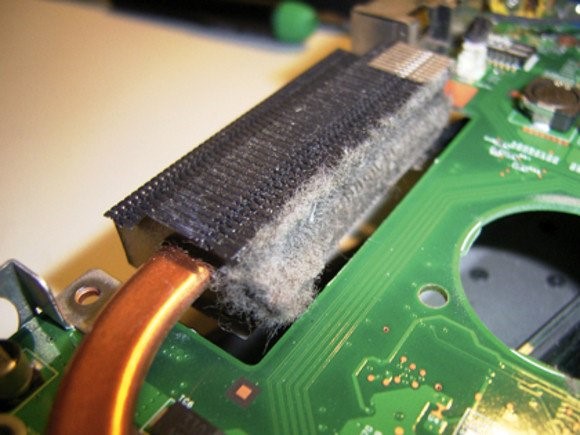
( 2 ) Compressed gas to blow dust off laptop heat exchanger. I got a warning message on my laptop that the fan was not functioning properly, and needed immediate attention. I think by that they meant the machine was overheating. It turns out that in your laptop there is a thick copper heat conductor that runs from your hot processing chip to the fan outlet on the side of your computer. The fan sucks air from the bottom of your PC, and blows it across a heat exchanger attached to the heat conductor. In time, dust can build up on this heat exchanger, and block the airflow.
The “right” way to address this problem is to disassemble the laptop to expose this heat exchanger from the inside (as shown in picture above), and peel the lint off. Problem is with my particular PC, it is a huge, perilous task to do this disassembly. The internet told me of a hack solution, which is to shoot cleaning gas into the heat exchanger from the outside, to knock off at least some of this lint. See this YouTube video by “Ultimate DIY” for the technique. It seemed to work for me – I got a can of cleaning gas (below), shot it into my PC side outlet vent in various spots, and have had no fan or overheating warnings since. (I also tweaked my standby power settings so the fan does not run all day if I am not using the PC).
( 3 ) Barge “rubber cement” to glue almost anything. This stuff sticks really well – spread a thin coat on both surfaces, wait 10-15 minutes, press together, and leave for a few hours. Unlike most “superglues”, it will work on rough or porous surfaces, including situations like leather where flexibility is needed.
( 4 ) Indulge in nutty taste, impressive appearance, and health lore of black rice. A couple of years ago I got some so-called “forbidden” (black) rice from an Asian gourmet outlet. (At one time this rice was so prized it was forbidden for anyone but the emperor to eat it). It tasted great, but was ruinously costly. I have found similar rice on Amazon, imported from Italy. No cooking directions on the box, so here is what worked for me: Add 1 cup rice to 2 cups boiling water, simmer 20 minutes, and strain off excess water. Try it once:
( 5 ) Small indoor/outdoor play/crafts table with bench seats for 2-8 year old kids. This has worked well, especially for otherwise messy foods and activities. Give it away when your kids are done with it. See picture below. The sides and benches fold in, under the table, for storage or transport. Includes optional shade umbrella. Avoid the smaller version of this table, it would get outgrown immediately.
Political betting has long been in a legal grey area. It seems that the Commodities Futures Trading Commission wants to make everything black and white, but at least for now it has simply made everything murkier.
PredictIt is the largest political betting site in the US; if you want to know who is likely to win an upcoming election, its the best place to find a quick answer. Prediction markets have two great virtues- they are usually right about what’s going to happen, and if they aren’t you can bet, making money and improving their accuracy at the same time.
PredictIt has operated since 2014 under a “no-action letter” from the CFTC. Effectively, the regulators told them “we’re not saying what you’re doing is definitely legal, but we know about it and have no plans to shut you down as long as you stick to the limits described in this letter”. But last week the CFTC withdrew their letter and ordered PredictIt to shut down by February 2023.
My first question was, why? Why shut them down now after 8 years when all their operations seem to be working as usual? The CFTC said only that “DMO has determined that Victoria University has not operated its market in compliance with the terms of the letter and as a result has withdrawn it”, but did not specify which of the terms PredictIt violated, leaving us to speculate. Did the scale simply get too big? Did they advertise too heavily? Did Victoria University, the official operator, let too much be handled by a for-profit subcontractor? Did some of their markets stray too far from the “binary option contracts concerning political election outcomes and economic indicators” they were authorized for?
PredictIt hasn’t been much clearer about what happened, simply putting a notice on their site. Their CEO did an interview on the Star Spangled Gamblers podcast where he said there was no one thing that triggered the CFTC but did mention “scope” as a concern- which I interpret to mean that they offered some types of markets the CFTC didn’t like, perhaps markets like “how many times will Donald Trump tweet this month”.
The other big question here is about PredictIt’s competitors. In 2021 it seemed like we were entering a golden age of real-money prediction markets, with crypto-based PolyMarket and economics-focused Kalshi joining PredictIt. I looked forward to seeing this competition play out in the marketplace, but it now seems like we’re headed toward a Kalshi-only monopoly where they win not by offering the product users like best, but by having the best relationship with regulators. Polymarket had offered markets without even a no-action letter, based on the crypto ethos of “better to ask forgiveness than permission”; this January the CFTC hit them with a $1.5 million fine and ordered them to stop serving US customers.
If the CFTC doesn’t reverse their decision to shut down PredictIt, then February 2023 will see a Kalshi monopoly. This has led to speculation that Kalshi is behind the attack on PredictIt; their cofounder issued this not-quite-a-denial. But it certainly looks bad for the CFTC that they are effectively giving a monopoly to the company that hires the most ex-CFTC members.
For now you can still bet on PredictIt or Kalshi (or even Polymarket if you’re outside the US). If you’d like to petition the CFTC about PredictIt you can do so here. It might actually work; while the CFTC’s recent actions certainly look cronyistic, they’ve been reasonable compared to other regulators. They’re giving PredictIt no fines and several months to wind down, and even Polymarket gets to keep serving non-US customers from US soil. I’d likely make different decisions if I were at CFTC but the ideal solution here is a change in the law itself, as we’ve seen recently in sports betting. Prediction markets are impressive generators and aggregators of information, and politics and policy are at least as valuable an application as sports. To go meta, suppose we want to know- will PredictIt survive past February? There’s a prediction market for that, and its currently saying they’ve got a 20% chance.
Saturday Night Live fans were introduced to Non-Fungible Tokens (NFTs) a year ago with this skit. Most people know that an NFT is a digital ownership certificate of some asset. That could be a physical asset, or a purely digital asset, like a crude graphic of an ape wearing a sailor’s hat which people are willing to pay hundreds of thousands or millions of dollars for.
The NFT market volume exploded in the second half of 2021:
On-line chain transactions as tracked by DappRadar. Source: Schwab.
The global NFT market is projected to grow from $1.9 billion in 2021 to $5.1 billion by 2028, an annual growth rate of some 18%.
But, why??? Why would people plunk down millions of dollars for just a certificate of ownership of something which may not be particularly beautiful or functional? It is just not something that would ever occur to me.
Part of the answer must be that there are a lot of people who have a lot of money that they don’t really need. This may be a function of the ever-increasing income inequality, but we will not go down that rabbit hole. But still, assuming some 30-something has 50 grand that he doesn’t need — why spend it on an NFT?
I did a real quick search on this topic. The most common reason appears to be the same reason many people buy rare coins or rare wines or other “collectibles” – they hope that someone else will pay them a higher price in the future. There also seems to be a sense of participating in some “community”, e.g., of Bored Ape Yacht Club aficionados. Much of it comes down to the psychology of what others will pay for something, which can be often explained in hindsight, but can be hard to predict if some asset class has not yet become “hot”.
It turns out that there are some other nuances to NFTs beside just hoping some “greater fool” will pay you more for the ownership of your ape drawing five years from now. I will conclude by pasting in some excerpts from an article on the Hyperglade blog, which frames the discussion partly in terms of the familiar economic concept of scarcity:
The key value proposition that NFTs often claim is scarcity. NFTs, as their name suggests, are each inherently unique on the blockchain, i.e. they can be attributed to a specific ‘hash’ or ID. But scarcity alone doesn’t drive value – it has to be a ‘scarcity’ that people want.
One of the first types of scarcity that people want is exclusivity. Exclusivity in this context means something that is very rare and has attributes of originality. Long before NFTs existed, collectibles took center stage in this arena. For example, trading cards, comic books, and antique toys were very valuable due to their scarcity and history associated with them. For example, the Captain America Comics No. 1, from 1941 sold for over $3 million! The NFT equivalent of this would be Jack Dorsey’s first tweet, which went for $2.9 million. Jack’s tweet illustrates the quintessential NFT qualities; distinct historical moment, a special creator, and only one of them.
Collectible NFTs come in many forms (in image, audio, or video formats), but the primary category is art (e.g. the Beeple NFT), followed by music, and sports moments (e.g. NBA top shot). Subsequently, given the depth of the cultural penetration of the content involved, collectibles are the most popular reason for investing in NFTs. According to Crypto.com’s NFT survey of ~30,000 polled users, 47% of those who own NFTs bought them for collectible value. Their primary motive – to be able to ‘flip’ (sell) at a higher price.
Access to a Network
More recently however, is the emergence of NFT collections that empower communities. These collections give holders access to special privileges, primarily access to special cryptocurrency related services and benefits (e.g. higher investment rates). For example, The famous Bored Ape Yacht club holders get to attend special events, E.g. in October 2021, members celebrated annual Ape Fest in New York City, Bright Moments Gallery.
Assets in virtual worlds and gaming
If you haven’t heard of them already, Virtual digital worlds are computer-simulated environments in which users roam around using their personal avatars. So NFTs neatly solve the problem of immutable land ownership. And depending on the demand, access and foot-traffic to certain places in these simulated world prices for virtual lands have skyrocketed. For example, even the cheapest land in decentraland exceeds $10,000. In a very similar way, web 3.0 games are expanding the use case by digitizing in-game assets so that they can be physically owned by players on the blockchain. In-game assets can include characters, cards, skins, etc. a list of which you can find here.
The Raspberry Pi 400 is billed as a complete desktop PC for under $100 ($99.99). Is this for real, considering the cheapest regular computers are around $300 (plus paying for Word and Excel)? Your intrepid correspondent here dives deep to bring you the truth.
The Raspberry Pi series of microcomputer have been around since 2011. A typical Raspberry Pi is a printed circuit board, about 3 inches by 5 inches, with a microprocessor chip, some RAM memory, and many input/output ports. These ports include four USB ports, two micro-HDMI monitor ports, an Ethernet LAN port, a 3.5 mm audio/visual jack, and special camera-related ports (which can also handle a touchscreen). Also, a port for a micro-SD memory card, which is where the operating system and apps and data reside. But wait, there’s more: in addition to Bluetooth and wi-fi capability, the Pi has a 40-pin port for input and output to interact with the physical world. All this for around $35! [1]
Developed by the British nonprofit Raspberry Pi Foundation as an affordable educational tool, millions of Raspberry Pi units have been purchased by students and techies to learn-as-you-play and to do some useful projects. I have been aware of these devices for years, but I have been put off by how many peripherals you have to add to get an actual working unit – you have to add a USB-C type power supply, a keyboard, a mouse, and a monitor or other display. And you have to make or buy a case to put the circuit board in. All of which seems like a sprawling mess of wires and stuff. Also, the Pi does not have the computing power and memory to graciously run Windows and Microsoft Office apps like Word. Instead, it uses a Linux operating system instead of Windows, and LibreOffice apps for word processing and spreadsheets. I have never used Linux; it sounded exotic, maybe with a steep learning curve.
However, the good folks at the Raspberry Pi Foundation have come out with a new package for the Pi. This is the Raspberry Pi 400. The computing guts are housed inside a keyboard, with all the ports in the back. Thus, they provide the case and a keyboard, all in one tidy package, for about $70. The 400 lacks a few of the input/output ports found on the regular Pi, namely the camera-related I/O and the 3.5 mm headphone/video jack, but retains the 40-pin I/O port. For $100 you can get the complete Raspberry Pi 400 Personal Computer kit which includes a power supply, a mouse, a micro-SD card with operating software, a cable for the monitor, and a thick manual. I finally succumbed and bought the complete kit. [2] (Tip: To get the $100 price, you may do better to find a physical store location like Micro Center, since sellers on Amazon mark it way up to around $160, or sometimes they substitute the bare keyboard for the full kit). You just need to supply a monitor or a TV that has an HDMI input. [3]
So, how good is the Raspberry Pi 400? I have been pleasantly surprised. First, there was almost no learning curve on using the operating system. The version of Linux that is on the microSD card and which gets booted into the working RAM has a very Windows-like visual interface. I did not have to type in any arcane commands. It was all obvious point and clicks to open apps and documents. It helps that this is a pretty simple system, so not a lot of choices to wade through.
I entered my LAN wi-fi password, and was immediately on the internet using the built-in generic Chrome (not Google Chrome) browser. With the recent, improved software on the Pi, it happily streamed YouTube videos, etc. The LibreOffice suite includes apps which have most of the capabilities of Microsoft Office Word, Excel, and PowerPoint. You can configure some settings in LibreOffice to get the appearances, menus, etc., to even more closely match the Office apps. LibreOffice can save and open files in standard Office formats ( .docx, .xlsx, etc.) so as to share files with the rest of the world. This is pretty good for free software.
I’d rate the keyboard experience as “OK”. The keys are full size, but the feel and the keyboard angle are enough different from my laptop that my typing was slow. Maybe that would improve with use. If I were going to do a lot of typing on this, I would prop it at a more horizontal angle and rest my wrists on a pad sitting in front of the keyboard, to replicate my hand position on my laptop.
I have not yet played around with the 40-pin I/O port on the Pi 400. That sets it apart from a regular PC, giving the user a means to read inputs from the physical world, analyze them, and output desired actions (e.g., operate the watering hoses in a greenhouse or garden, depending on temperature and dryness of the ground). There are zillions of plans available on line for projects controlled by Raspberry Pi’s. Some are practical, some involve robots, and some are just whimsical, like retro video games and like this sugar cube launcher, which measures the distance to a coffee cup and shoots a sugar cube through the air with a trajectory calculated to land it in the cup. And here are another 26 Awesome Uses for a Raspberry Pi , including stop-motion and time-lapse videos (may not work on Pi 400 because it lacks regular Raspberry camera interface) and turning your Raspberry into a Twitter bot or web server that can host your own blog site.
The Verdict: Is This a Real PC?
Would I recommend this as a primary computer? Well, maybe, for someone on an extreme budget or living in a low-income country, or for someone in a situation where their computer is liable to get lost or broken or stolen. After all, it can do practically anything that a regular PC can do (email, YouTube, word processing, etc.). One area it falls way short in is compute-intensive gaming, so it is not for you if you need realistic spatters on your screen for Call of Duty. Also, if you have to go out and buy a new $150 monitor to use it, the value proposition starts to fall apart, but usually you have an old monitor or TV around or can borrow one from someone.
The LibreOffice apps will do most of what Microsoft Office does. The Pi cannot download Office and run it offline. However, if you can’t live without the authentic Microsoft Word experience, you can use the Pi as a terminal to log into Microsoft 365 and pay for and run the Web version of Word, Excel, etc. Also, you can plug in a USB microphone and USB webcam and use the Pi with Zoom.
Here is a list of further recommended programs ( all open source, Linux compatible) to install on a Raspberry Pi. These include programs for photo editing, media streaming, gaming, and connecting to a VPN. Here are more tips on the Pi 400 for home office use, including printing and online collaboration tools.
So, yes, a Pi 400 can do most of what desktop PC does, all for $99.99 plus tax [4]. Not to mention not paying an extra $150 or so for Microsoft Office. That said, most of us already have a portable laptop as our primary computer. We can carry it anywhere, and it has built-in display, camera, and speakers. And we have a large monitor on our desk for the desktop experience. For most of us, it is worth spending say $600 for our laptop-plus-monitor versus using an underpowered desktop PC tethered to a monitor and power cord.
So, realistically, most adults in the West would not probably choose the Pi 400 as their primary computer. However, it is a great little spare machine to have around for guests or for kids or for if something happens to your main PC. It can be a second PC on the corner of your desk to use while your main computer is tied up on a Zoom call. Multiple people (e.g. students in a classroom) can share a Pi, especially if each person has their own microSD card or USB to store their individual documents. You could use a Pi to stream music or video over some random speaker or monitor or TV or dedicate it to some similar specific purpose.
The software load includes Python, a popular programming language which may be worth learning. Also, the Linux operating system is very widespread in the computer world, powering most servers, so it can be useful to learn Linux as well. Although the newbie user will likely just use the Windows-like graphical user interface, the command line text Linux commands are available for use and practice on the Pi. The Pi 400 software also includes “Scratch” (good tutorial here):
Scratch is an easy to use block-based visual programming software that can run on a Raspberry Pi. Using this tool, you will be able to create your very own animations, games, and more using a straightforward drag-and-drop interface. The Scratch software is a great way to get young people started with programming and develop a general interest in computing.
The Raspberry Pi is a powerful tool for interfacing with the physical world, in the “internet of things.” A tech-inclined person (including a high school student) can find or invent a variety of fun and useful projects which make use of the input/output capabilities of the Pi. Since the internet can be problematic for kids, these sorts of projects with the Pi can keep them busy and learning on a real computer without necessarily having routine internet access.
Endnotes
[1] Some even cheaper, more stripped-down Raspberries have recently become available, such as the Pico and the Zero 2 W, to use as dedicated microprocessors for some specific application.
[2] I think one reason I got the Pi 400 was sheer nostalgia; my very first personal computer, purchased around 1985, was a Commodore 64. Like the Pi 400, the Commodore 64 was a low-cost keyboard with interface ports that you hooked up to a TV or monitor. I used the I/O port on the Commodore to control a Radio Shack robot arm, using relays on a printed circuit board that I etched myself. Good times.
[3] Normally, the sound output from the Pi 400 is transmitted to the monitor/TV along with the video in the HDMI. If you have some old monitor or TV that only has VGA video input, you can buy an adapter cable that converts HDMI to VGA (make sure you specify male/female correctly), but that only gets you the visual output. To hear the sound in this case, you’d have to either pair up an external Bluetooth speaker with the Bluetooth in the Pi, or plug in a USB speaker. (The other Raspberry Pi models, like the 4 B, include a 3.5 mm jack that sends both sound and video, so you could just plug in a headphone and skip the USB speaker).
A couple of random tips on the Pi 400 keyboard: The Raspberry key, near lower left, brings up the main menu. To get a clean shutdown, properly saving and closing documents and apps, use Fn F10. Another observation: You can run the Pi off a USB thumb drive instead of the micro-SD card, which can give faster performance and more storage.
[4] One learning I got from doing this review is that you could use your phone as a desktop PC: with an iPhone or iPad, for instance, you can drive an external monitor with a cable from the Lightning port, and use a Bluetooth keyboard/mouse for inputs. There are word processor and other apps that run on phones and tablets, including Microsoft Office. This should give a computing experience similar to that on a Raspberry Pi, although using iOS or Android-specific forms of the various apps.
Recently, I’ve been buying a lot more non-durable goods when they are on sale. Whereas previously I might have purchased the normal amount plus one or two units, now I’m buying like 3x or 4x the normal amount.
What initially led me here was the nagging thought that a 50%-off sale is a superb investment – especially if I was going to purchase a bunch eventually anyway. I like to think that I’m relatively dispassionate about investing and finances. But I realized that I wasn’t thinking that way about my groceries. The implication is that I’ve been living sub-optimally. And I can’t have that!
If someone told me that I could pay 50% more on my mortgage this month and get a full credit on my mortgage payment next month, then I would jump at the opportunity. That would be a 100% monthly return. Why not with groceries? Obviously, some groceries go bad. Produce will wilt, dairy will spoil, and the fridge space is limited. But what about non-perishables? This includes pantry items, toiletries, cleaning supplies, etc.
Typically, there are two challenges for investing in inventory: 1) Will the discount now be adequate to compensate for the opportunity cost of resources over time? 2) Is there are opportunity cost to the storage space?
For the moment, I will ignore challenge 2). On the relevant margins, my shelf will be full or empty. I’ve got excess capacity in my house that I can’t easily adjust it nor lend out. That leaves challenge 1) only.










 Economist Writing Every Day