Economics as a discipline really likes to boil things down to their essentials. There are plenty of examples. How many goods can one consume? Just two, bread and not bread. How can you spend your time? You can labor or leisure. How do you spend your money? Consume or save. It’s this last one that I want to emphasize here.
First, all income ultimately ends up being spent on consumption. Saving today is just the decision to consume in the future. And if not by you, then by your heirs. One determinant of inter-temporal consumption decisions is the real rate of return. That is, how many apples can you eat in the future by forgoing an apple eaten today? The bigger that number is, the more attractive the decision to save.
Further, since most saving is not in the form of cash and is instead invested in productive assets, we can also characterize the intertemporal consumption problem as the current budget allocation decision to consume or invest. The more attractive capital becomes, the more one is willing to invest rather than consume. The relative attractiveness between consumption and investment informs the consumption decision.
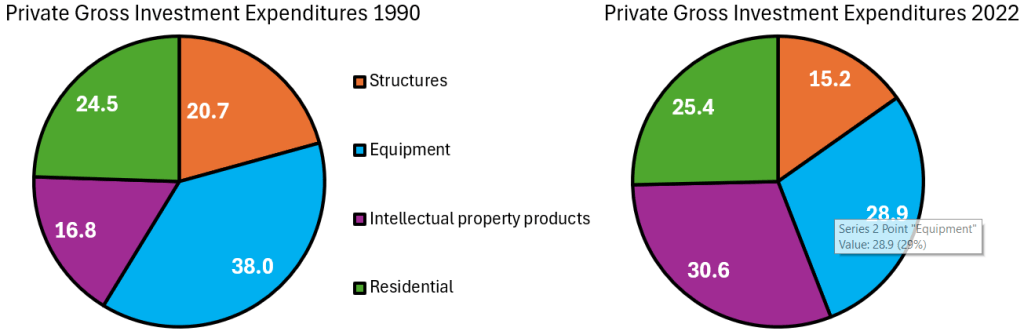
How attractive is investment? I’ll illustrate in two graphs. First, if the price of investment goods falls relative to consumption goods, then individuals will invest more. The graph below charts the price ratio of investment goods to consumption goods. Relative to consumption, the price of investment has fallen since 1980. Saving for the future has never been cheaper!
Of course, as in a price taker story, I am assuming that individuals don’t affect this price ratio. Truly, prices are endogenous to consumption/investment decisions. For all we know, it may be that the prices of investment goods are falling because demand for investment goods has fallen. But that doesn’t appear to be the case.
When I give talks about AI, I often present my own research on ChatGPT muffing academic references. By the end I make sure that I present some evidence of how good ChatGPT can be, to make sure the audience walks away with the correct overall impression of where technology is heading. On the topic of rapid advances in LLMs, interesting new claims from a person on the inside can by found from Leopold Aschenbrenner in his new article (book?) called “Situational Awareness.” https://situational-awareness.ai/ PDF: https://situational-awareness.ai/wp-content/uploads/2024/06/situationalawareness.pdf
He argues that AGI is near and LLMs will surpass the smartest humans soon.
AI progress won’t stop at human-level. Hundreds of millions of AGIs could automate AI research, compressing a decade of algorithmic progress (5+ OOMs) into ≤1 year. We would rapidly go from human-level to vastly superhuman AI systems. The power—and the peril—of superintelligence would be dramatic.
Based on this assumption that AIs will surpass humans soon, he draws conclusions for national security and how we should conduct AI research. (No, I have not read all if it.)
Isn't it true that the "smart high schooler" can just repeat what they learned in a textbook? Why is it a linear progression from there to an AI researcher who is producing novel brilliant papers?
I might offer to contract out my services in the future based on my human instincts shaped by growing up on internet culture (i.e. I know when they are joking) and having an acute sense of irony. How is Artificial General Irony coming along?
Today I will write about something I care deeply about: the wellbeing of the moms of young children.
I can remember having a child enrolled in preschool. It was expensive but it was worth it, for us. What follows will be most relevant to readers who are working full-time and have children enrolled in full-time daycare/preschool. That is not the right choice for every family. If it’s the choice you made, then read on.
Do less for preschool. Save your energy and money for the years when your child will actually remember.
I recently did some business where I had a text file of names and email addresses that I wanted to send a group email to, in Gmail. Here I will share the steps I followed to import this info into a Google contact group.
The Big Picture
First, a couple of overall concepts. In Gmail (and Google), your contacts exist in a big list of all your contacts. To create a group of contacts for a mass email, you have to apply a label to those particular contacts. A given contact can have more than one label (i.e., can be member of more than one group).
To enter one new contact at a time into Gmail, you go to Contacts and Create Contact, and type in or copy/paste in data like name and email address for each person or organization. But to enter a list of many contacts all at once, you must have these contacts in the form of either a CSV or vCard file, which Google can import. So here, first I will describe the steps to create a CSV file, and then the steps to import that into Gmail.
Comma-separated values (CSV) is a text file format that uses commas to separate values. Each record (for us, this means each contact) is on a separate line of plain text. Each record consists of the same number of fields, and these are separated by commas in the CSV file.
A list of names and of email contacts (two fields) might look like this in CSV format:
We could have added additional data (more fields) for each contact, such as home phone numbers and cell numbers, again separated by commas.
For Gmail to import this as a contact list, this is not quite enough. Google demands a header line, to identify the meaning of these chunks of data (i.e., to tell Google that these are in fact contact names, followed by email addresses). This requires specific wording in the header. For a contact name and for one (out of a possible two) email address, the header entries would be “Name” and “E-mail 1 – Value”. If we had wanted to add, say, home phones and cell phones, we could have added four more fields to the header line, namely: ,Phone 1 - Type,Phone 1 - Value,Phone 2 - Type,Phone 2 – Value. For a complete list of possible header items, see the Appendix.
The Steps
Here are steps to create a CSV file of contacts, and then import that file to Gmail:
( 1 ) Start with a text file of the names and addresses, separated by commas. Add a header line at the top: Name, E-mail 1 – Value . If this is in Word, Save As a plain text file (.txt). For our little list, this text file would look like this:
( 2 ) Open this file in Excel: Start Excel, click Open, use Browse if necessary, select “All Files” (not just “Excel Files”) and find and select your text file. The Text Import Wizard will appear. Make sure the “Delimited” option is checked. Click Next.
In the next window, select “Comma” (not the default “Tab”) in the Delimiters section, then click “Next.” In the final window, you’ll need to specify the column data format. I suggest leaving it at “General,” and click “Finish.” If all has gone well, you should see an Excel sheet with your data in two columns.
( 3 ) Save the Excel sheet data as a CSV file: Under the File tab, choose Save As, and specify a folder into which the new file will be saved. A final window will appear where you specify the new file name (I’ll use “Close Friends List”), and the new file type. For “Save as type” there are several CSV options; on my PC I used “CSV (MS-DOS)”.
( 4 ) Go to Gmail or Google, and click on the nine-dots icon at the upper right, and select Contacts. At the upper left of the Contacts page, click Create Contact. You’ll have choice between Create a Contact (for single contact), or Create multiple contacts. Click on the latter.
( 5 ) Up pops a Create Multiple Contacts window. At the upper right of that window you can select what existing label (contact group name) you want to apply to this new list of names, or create a new label. For this example, I created (entered) a new label (in place of “No Label”), called Close Friends. Then, towards the bottom of this window, click on Import Contacts.
Then (in the new window that pops up) select the name of the incoming CSV file, and click Import. That’s it!
The new contacts will be in your overall contact list, with the group name label applied to them. There will also be a default group label “Imported on [today’s date]” created (also applied to this bunch of contacts). You can delete that label from the list of labels (bottom left of the Contacts page), using the “Keep the Contacts” option so the new contacts don’t get erased.
( 6 ) Now you can send out emails to this whole group of contacts. If this is a more professional or sensitive situation, or if the list of contacts is unwieldy (e.g. over ten or so), you might just send the email to yourself and bcc it to the labeled group.
APPENDIX: List of all Header Entries for CSV Files, for Importing Contacts to Gmail
I listed above several header entries which could be used to tell Google what the data is in your list of contact information. This Productivity Portfolio link has more detailed information. This includes tips for using VCard file format for transferring contact information (use app like Outlook to generate VCard or CSV file, then fix header info as needed, and then import that file into Google contacts).
There is also a complete list of header entries for a CSV file, which is available as an Excel file by clicking his “ My Google Contacts CSV Template “ button. The Excel spreadsheet format is convenient for lining things up for actual usage, but I have copied the long list of header items into a long text string to dump here, to give you the idea of what other header items might look like:
I bolded the two items I actually used in my example (Name and E-mail 1 – Value), as well as a pair of entries ( Phone 1 – Type and Phone 1 – Value) as header items which you might use for including, say, cell phone numbers in your CSV file of contact information.
I’ve written about IPUMS before. It’s great. Among individual details are their occupations and industry of their occupation. That’s convenient because we can observe how technology spread across America by observing employment in those industries. We can also identify whether demographic subgroups differed or not by occupation. There’s plenty of ways to slice the data: sex, race, age, nativity, etc.
But what do we know about historical occupations and what they entailed? At first blush, we just have our intuition. But it turns out that we have more. There is a super boring 1949 report published by the Department of Labor called the “Dictionary of Occupational Titles”. The title says it all. But, the DOL published another report in 1956 that’s conceptually more interesting called “Estimates of Worker Trait Requirements for 4,000 Jobs as Defined in the Dictionary of Occupational Titles: An Alphabetical Index”. The report lists thousands of occupations and identifies typical worker aptitudes, worker temperaments, worker interests, worker physical capacities, and working conditions. Below is a sample of the how the table is organized:
What with all the talk about semi-conductor production and rare-earth mineral extraction, I think that it’s worth examining what the USA produces in terms of what we get out of the ground. This includes mining, quarrying, oil and natural gas extraction, and some support activities (I’ll jump more into the weeds in the future). I’ll broadly call them the ‘extractive’ sectors. How important are these industries? In 2021 extractive production was worth $520 billion. That was roughly 2% of all GDP. Below is the break down by type of extraction.
Examining the graph of total extraction output below tells a story. The US increased production of extracted material substantially between the Great Depression and 1970. That’s near the time that the clean water and clean air acts were passed. But the change in the output growth rate is so stark, that I suspect that those were not the only causes of change (reasonable people can differ). For the next 40 years, there was a malaise in output. This was the period during which it was popular to talk about our natural resource insecurity. As in, if we were to be engaged in a large war, then would we be able to access the necessary materials for wartime production?
But for the past 15 years we’ve experienced a boom with extracted output rising by 50%, an average growth rate of 2.7% per year. That’s practically break-neck speeds for an old industry at a time when the phrase ‘great stagnation’ was being thrown about more generally. By 2023, we were near all-time-high output levels (pre-pandemic was higher by a smidge).
For people concerned about resource security, the recent boom is good news. For people who associate digging with environmental degradation, greater extraction is viewed with less enthusiasm. Those emotions are especially high when it comes to fossil fuel production. Below is a graph that identifies the three major components of extraction indexed to the 2021 constant prices. By indexing to the relative outputs of a particular year, the below graph is a close-ish proxy to real output that is comparable in levels.
Speaking of microeconomics…I just learned of a hack that can save some money at home or in a business. It started with an email from an esteemed friend who leads an interesting life as a welder/rigger/artist. He helped build some of the giant sets at the Burning Man festival which, well, burned. His inquiry, with some personal references edited out, went like this:
…At burning man i once watched a man save the day by patching a hole in the plastic gas tank of a golf cart with super glue, toilet paper and vinegar… Suddenly we had a functioning golf cart. Although I’ve never gotten to use this I remember this trick dearly.
Just today [my brother] was telling me about … breaking his glasses. …he had already fixed his glasses. How? He said “I’m pretty good at super glue and baking soda.” … He said the baking soda acts as an accelerant and gets very hard when you add super glue to it.
Being a chemical engineer by background, and always curious about household chemistries, this got me poking about the internet. Here is what I found.
The main ingredient in most repair superglues is ethyl 2-cyanoacrylate, along with some polymethacrylate gel and a little sulfonic acid, which acts as a stabilizer. When the superglue comes in contact with moisture, that triggers the polymerization reaction, so the glue solidifies and bonds to surfaces. It works best as a very thin layer squeezed between two closely fitting surfaces. Thicker droplets of superglue may be very slow to harden or not harden at all, towards the middle.
Thus, superglue is notoriously bad for filling in gaps or spaces or holes. For gap filling, you would normally turn to epoxy glue (for strength) or silicone (for flexibility). These glues have their own advantages and disadvantages. I don’t think that either silicone or common epoxy would stand up well to gasoline.
My internet research found that porous paper, like toilet paper, tissue paper, or paper towel, can catalyze the hardening of superglue. You can stuff a hole with a wad of toilet paper, or make a shape out of paper towel, and saturate it with superglue, and it will instantly harden. For the nerds among us, I will note that paper is mainly cellulose, which is a polymer of sugar (glucose), which has water type -OH groups sticking out all over, which harbor a surface layer of adsorbed water. This YouTube video by Mr Made has excellent examples of using porous paper for super glue to instantly fill in a hole or build up a solid shape.
It is critical to use freshly opened superglue, and use a thin runny liquid formulation which will quickly saturate the paper, not a thick gel type superglue.
It turns out that baking powder can be used instead of porous paper with superglue to fill in holes or cracks or make solid shapes. You can sprinkle in a thin layer of baking soda, then saturate that with the glue, then add another layer of baking powder and glue, etc. This YouTube video , by The Maker, nicely demonstrates this technique.
So there you have it, hack away with your superglue.
Don’t Try This At Home:
The main loose end from my researches involves the role of vinegar in that fix of the golf cart fuel tank at Burming Man. Vinegar is usually mentioned as a solvent for superglue, and chemically vinegar is an acid whereas baking soda is a base, so vinegar seems like the opposite of an accelerant for the polymerization. I can only speculate that for making a very thick wad of paper plus superglue to fix the fuel tank, the vinegar may have been used deliberately to slow down the glue hardening a bit. But that is just a guess. I think the cyanoacrylate superglue would have a reasonable chance to withstand gasoline, but I sure would be nervous about relying on such a patch for a fuel tank. It would not take much of a gasoline leak to make Burning Man all that more memorable. Don’t try THIS at home.
Last weekend brought me back to Temple University, ten years after graduating, for a conference of econ PhD alums. I had so many reactions:
Mixing a research conference with what is effectively a reunion or homecoming is a great idea for a PhD program, and more schools should do it. It brought together alumni from all different years, but it especially felt like a reunion to me since it’s been ten years since I graduated (not that I really know about reunions; I’ve never been to a high school or college one).
Philadelphia in general and Temple University in particular have gotten much nicer (though still gritty). Some of this I expected; the country is getting steadily richer, and it seems like every college is always on a building spree. But as with New Orleans, it is a city still well below its peak population that I first got to know in the aftermath of the great recession. Unemployment in Philly is now well under half what it was the whole time I lived there, and it shows.
Life is short. I was saddened, but not shocked, to hear that one of my professors had died. I was saddened and shocked to hear that one of my fellow students had.
As a kid, whenever I went back to one of my old schools, I usually felt nostalgia mixed with the feeling that everything seemed small. Then I thought this smallness was only about me having grown taller, but now I wonder. At Temple the economics department has changed buildings, but when I went back to the old building everything seemed small, despite me being the same size I was in grad school. But at the time the building loomed so large in my mind; I was so focused on the things that happened there, the classes and tests, the study sessions and writing in the computer lab, what the professors thought, and everything that it all represented. All that apparently made the rooms seem physically larger in a way they now don’t once I have graduated and the professors moved.
Temple PhDs are much more successful than I would have guessed at the time. It was hard for students attending what was then a bottom-ranked program during the Great Recession to be optimistic about our job prospects, especially when we worried we might fail out of the program (a valid concern when, afaik, only 4 of the 11 students in my year finished their PhDs). But things turned out great; just in the past 10 years from a small program there are many people who are tenured or tenure track at decent schools, who have research or important supervisory positions at the Fed, or who are making a name for themselves in the private sector (like Adam Ozimek).
Why have we so exceeded our low expectations? The improving economy helped. Economics PhDs from anywhere turned out to be a valuable degree. Perhaps our training was stronger than we gave it credit for at the time. I see two main tracks for success coming out of a lower-ranked program, where the school’s name alone might not open doors:
find some way to get your foot in the door of a major institution like the Fed system or a major bank, then work your way up. The initial way in could be something less competitive, like an internship or a job you don’t necessarily need a PhD for. But once you are in you will be judged mostly on your performance within the institution, not your credentials. In a panel on non-academic jobs, several alums emphasized that conditional on having enough technical skills to get hired, at the margin people/communication skills are much more important to advancement than further technical skills.
Temple’s economics PhD program paused admissions back in 2020, but is aiming to restart with a redesigned program in 2025.
There were not a lot of successful female writers and academics in the 1970’s. Maybe I underestimate how many there were, but obviously they would have been in the minority. I’m reading a chapter on the anthropologist Mary Douglas who somehow combined raising three children with remaining active in academia. I read a few pages while helping at the Cub Scout camping trip.
In one of her books, Douglas added an apology for professional duties eclipsing domestic ones: ‘All our things have fallen into neglect while I have been writing, floors unpolished, curtains falling off hooks. I am grateful to my family for their patience.’
page 130 of The Slain God by Timothy Larsen
It is irksome to hear this woman apologizing for working what is essentially two jobs and performing so well at each one. (I wouldn’t want to put anyone off reading Larsen, who admires her very much.)
I had planned to do this a year ago, but then I ended up writing papers on artificial intelligence and doing a bunch of related speaking engagements. (I love it – anyone who wants a speaker on ChatGPT should invite me out.) Anyway, I’m going to try to do the equivalent of fixing the “curtains falling off hooks.” The curtains really do fall down. You could have a well-functioning household and drawers full of clothes that fit your children… and then if someone is not engaged in constant warfare… it will all fall apart in about 6 months.
This is a transcript of Lex Fridman Podcast #419 with Sam Altman 2. Sam Altman is (once again) the CEO of OpenAI and a leading figure in artificial intelligence. Two parts of the conversation stood out to me, and I don’t mean the gossip or the AGI predictions. The links in the transcript will take you to a YouTube video of the interview.
(00:53:22) You mentioned this collaboration. I’m not sure where the magic is, if it’s in here or if it’s in there or if it’s somewhere in between. I’m not sure. But one of the things that concerns me for knowledge task when I start with GPT is I’ll usually have to do fact checking after, like check that it didn’t come up with fake stuff. How do you figure that out that GPT can come up with fake stuff that sounds really convincing? So how do you ground it in truth?
Sam Altman(00:53:55) That’s obviously an area of intense interest for us. I think it’s going to get a lot better with upcoming versions, but we’ll have to continue to work on it and we’re not going to have it all solved this year.
Lex Fridman(00:54:07) Well the scary thing is, as it gets better, you’ll start not doing the fact checking more and more, right?
Sam Altman(00:54:15) I’m of two minds about that. I think people are much more sophisticated users of technology than we often give them credit for.
Sam Altman(00:54:21) And people seem to really understand that GPT, any of these models hallucinate some of the time. And if it’s mission-critical, you got to check it.
Lex Fridman(00:54:27) Except journalists don’t seem to understand that. I’ve seen journalists half-assedly just using GPT-4. It’s-
Sam Altman(00:54:34) Of the long list of things I’d like to dunk on journalists for, this is not my top criticism of them.
As EWED readers know, I have a paper about ChatGPT hallucinations and a paper about ChatGPT fact-checking. Lex is concerned that fact-checking will stop if the quality of ChatGPT goes up, even though no one really expects the hallucination rate to go to zero. Sam takes the optimistic view that humans will use the tool well. I suppose that Altman generally holds the view that his creation is going to be used for good, on net. Or maybe he is just being a salesman who does not want to publicly dwell on the negative aspects of ChatGPT.
I also have written about the tech pipeline and what makes people shy away from computer programming.
Lex Fridman(01:29:53) That’s a weird feeling. Even with a programming, when you’re programming and you say something, or just the completion that GPT might do, it’s just such a good feeling when it got you, what you’re thinking about. And I look forward to getting you even better. On the programming front, looking out into the future, how much programming do you think humans will be doing 5, 10 years from now?
Sam Altman(01:30:19) I mean, a lot, but I think it’ll be in a very different shape. Maybe some people will program entirely in natural language.
Someday, the skills of a computer programmer might morph to be closer to the skills of a manager of humans, since LLMs were trained on human writing.
In my 2023 talk, I suggested that programming will get more fun because LLMs will do the tedious parts. I also suggest that parents should teach their kids to read instead of “code.”
The tedious coding tasks previously done by humans did “create jobs.” I am not worried about mass unemployment yet. We have so many problems to solve (see my growing to-do list for intelligence). There are big transitions coming up. Sama says GPT-5 will be a major step up. He claimed that one reason OpenAI keeps releasing intermediate models is to give humanity a heads up on what is coming down the line.